How to Build Your Own Agent Operating System
AI News Today | Julian Goldie Podcast · 2026-06-01 · 8 min
Show full episode description
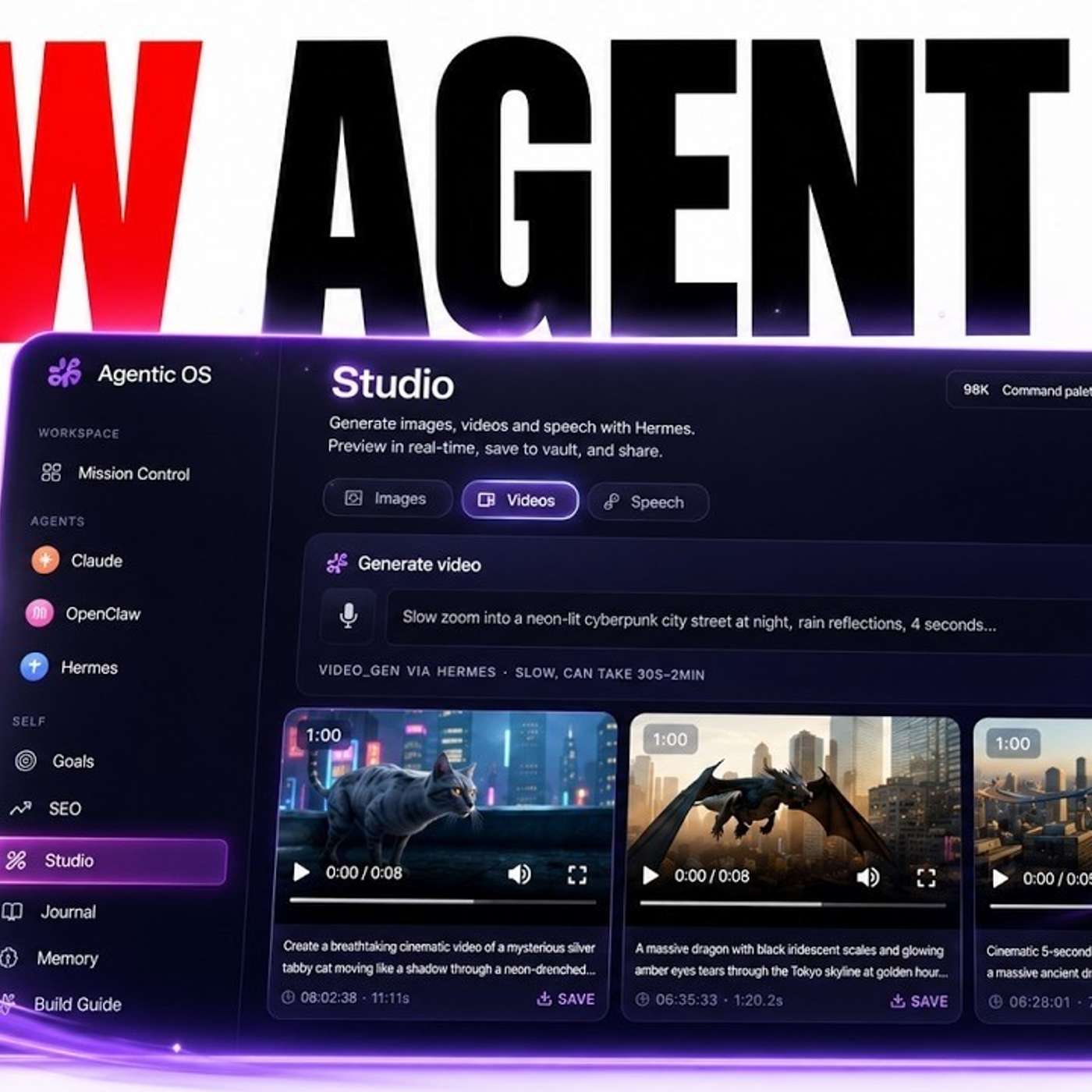
Build a No-Code Agent Operating System (Mission Control for Your AI Agents) The episode shows how to build a non-technical “agent operating system” that acts as a mission control for multiple AI agents and workflows (SEO, video, text-to-speech, images) using tools like Claude, Hermes Agent, and open-source projects such as OpenJarvis. The presenter demonstrates plugging a CLI-based agent into a cleaner UI with features like a Kanban board, shared skills, optional memory via Obsidian, and local model support via Ollama, noting it can run locally or on a VPS. They outline a repeatable “loop method”: find an agent, ask Claude for a build recipe and downsides, order it to build (with bypass permissions), and verify it works—troubleshooting with screenshots if needed—highlighting that installation can take minutes (about six) and can be rolled back.
✨ Episode Outline — click any point to jump to it in the episode
Problem solved
Replacing a clunky terminal with a custom non-technical Mission Control to run and manage your AI agents.
Benefits
- Non-technical, no code, just talk to Claude
- Kanban Mission Control to organize agent teams
- Plug in new models and agents within minutes
- Easy rollback of changes you dislike
- System never falls behind as new models drop
Use cases
- Installed Open Jarvis (~1,600 GitHub stars) into the agent OS in about 6 minutes
- Plugged Hermes (150 skills) and OpenClaw (thousands of skills) into one Kanban layer
- Built workflows for SEO, video, NotebookLM, text-to-speech and image agents
- Added Step 3.7 Flash free Hermes model into the agent grid automatically
- Troubleshot Jarvis not showing by pasting a screenshot into Claude
KPIs / results
Tools / build
- Hermes Mission Control Kanban agent OS
- Open Jarvis integration with local Olama models
- Anti-gravity CLI integration
- SEO, video, studio and NotebookLM workflows
📑 Chapters — tap a time to jump there
00:00
Build Your Agent OS
- Build your own agent operating system, no coding
00:32
Why Mission Control Wins
- Why Mission Control beats raw terminal
01:22
Local vs VPS Setup
- Local vs VPS setup options
03:05
Install and Configure Jarvis
- Install and configure Jarvis with bypass permissions
03:41
Avoid Overbuilding Workflows
- Avoid overbuilding; even one agent is powerful
04:34
New Models Plug In Fast
- New models like Step 3.7 Flash plug in fast
05:07
Test and Troubleshoot
- Test and troubleshoot with screenshots in Claude
05:52
Rollback and UI Benefits
- Rollback changes and UI benefits over terminal
06:17
The Loop Method Framework
- The Loop Method four-step framework
07:14
No Code Needed Mindset
- No code needed, you are the operator
07:35
Get the Agent OS Pack
- Get the Agent OS pack in AI Profit Boardroom
I'm going to show you how to build your own agent operating system like you can see right here. So we've plugged in all of our AI agents and the cool thing is about this, like you don't need to be up to code, it's non-tentical, anyone can do this. I literally created this and it's convolved into this crazy machine with all my workflows for CO, video agents or even, for example, generating videos and text-to-speech and images using my favourite AI agents. And so I'm going to show you the process that I use step by step for creating a whole system like this. So you can take like any project or idea that you have and give it an amazing mission control and that way you can control your agents way better. It's way more fun. You can see everything that you've created. You can build new things into it and you can basically automate anything that you want so let me show you an example of this practice so let's say for example Open Jarvis this looks like a really cool open source project kind of reminds me of open claw or hermes i know it's pretty popular i think it's got about a thousand six hundred thousand github could be really cool to build something like that into an agent operating system right so how do you do this the first thing that i would do is i would take the information from the github like this and that's the cool thing about open source projects is like you can take the mason structure and the architecture of something like this and build it into something even better so i'll give you an example this is is what we did for hermes agent where of the idea of it of using hermes agent what i don't love is going into my terminal and not really being able to control it or manage it in the same way right like for example if we're looking through the terminal here it doesn't look that nice doesn't look that interesting isn't that fun to use difficult cfm we've created okay so what i did is i plugged it into mission control ideas and then all of a sudden we've got a kanban board where i can build teams of agents it's easier to organize easier to see everything in different places easier to navigate and also see what we've built previously which is pretty cool too so how do you do this let's say for example we're starting with open jarvis so you can use hermes agent or claude or any sort of ai agent that's running locally to help you build this because the mission control you're building is local as well right now you could also do this on dps as an example that you can see like victor built his own agent os and john as well these are all ai profitable members and you can see this one was actually built as a mission control on a dps so it doesn't have to be built locally but you do want to build it in the same place where you have your agent stored so if you go back into claude now you can see here i said do you think we could build something like this into our agent os it said sure and cs and we're using opus 1.8 i have previously used opus 1.7 for this and still pretty good and though it says sure and cs it fits into your agent or operating system almost perfectly and it'd fill a gap that none of your other agents suffer perfect and this could be like the eighth agent that we had in and also this works really well with clis right so for example anti-gravity they brought out a cli recently which you can use for free and then we plugged it into the system here as well same sort of process and so number one you ask Claude whether you can do it Claude gives you an idea in terms of the recipe and it explains how we can do this so based on our existing structure we could create like a chat we could have workspace tabs as well with everything that we create with this and the other cool thing that's unique about this is you could actually run a local models as well the other cool thing is when you do all of this every single agent has its own skills so for example if you look at hermes that has 150 skills if you look at openclaw that has thousands of skills and so you can share your skills across the same layer and not just that but if you have memory like we have of obsidian you can plug that into the system too but i'll try to simplify today to not make this too complicated or overwhelming so you can see here it talks about the downsides as well so some of the friction that will be involved and then we can say okay great yeah that's set up for me and so you see how literally i'm just talking to claude almost like i would talk to a developer or someone working on my team but the difference is claude works weekends claude works 24 7 claude doesn't get tired right whereas if you had a team trying to build this out for you they might get confused or they might take a day off or everyone needs a break sometimes right so it's a big difference between using claude to help you build this out and using developer it's way more efficient to do this right and something that i've found developers might take like a few weeks to do you can do in a few minutes with claude that's the other crazy thing about this so now what it's doing is it's basically looking through the setup for open jarvis having looking around understanding what to build into it and then if we go back into Claude it's already installed open jarvis eli and now it's doing the rest now one thing that i'll say here is that what's really useful if you're building this inside core particularly is to have bypass permissions on so i just let it build out and then i can always roll out i can roll back changes if there's anything i don't like it's now using open jarvis and olama to set this up the other cool thing about this is it would be a free local model that runs with open jarvis you could probably plug in an api as well into it if you wanted to but literally there's very little technical work from you you just need the idea and again the whole point of the agent operating system is that you are an operator and the other cool thing about this is every time you use it you get more ideas right you get more understanding of what you can do and how you can build into it what i will say and this is something that i've learned as we build this out is that sometimes you can add too much right so you don't need all this even if you just had one agent and you were building with this it would still be pretty powerful because it's so much better than terminal and it's customized exactly how you want it to the point where you could change the colors or you could have more workflows here right so for example let's say i've got this seo tool i've got the video tool i've got studio i've got notebook lem inside there and the kanban it's okay maybe what i want to build next is a workflow for generating ads inside here as well and i could easily build that in and so it makes you very powerful because you learn and understand how to build out your own tool almost like a sas tool but you don't have to be technical anymore to it and i think 99% of people don't even realize you can do this the other interesting thing about this is that claude becomes better and better at doing this what i actually like to do inside paul particularly is have a pinned conversation where i can come back to a conversation that has all the context on my previous conversations about the agent west and so that way you've got this ready to go conversation you don't need to explain anything again already picks up where you left off and you can just have it run in the background whilst you're just going off and doing other things i'll give you another example so for example step 3.7 flash just released a new free model with hermes and we've already plugged that into the agent operating system so what i would say about this as well as it doesn't matter what new models come out and it doesn't matter what new agents come out because the system stays the same right you're never going to fall behind and then anything that new that comes out within a few minutes you can just plug it in and so you have something that constantly evolves never falls behind and you have a system that consistently improves every single day and you can see it's adding it into the mission control agent grid automatically too and now you can see that we have built this in right so it took about six minutes to get this fully installed bear in mind it just set up Jarvis inside our full local operating system however it's not magic so you can see for example in lord here it says it's tested out which is perfect so it's done testing the back end food and it says that javis is showing in the side panel but if we go over here where is it it's not there so you got to test this stuff out as well don't just rely on the ai to tell you what should we do next paste in a screenshot explain the error and this is how you can troubleshoot back and forth with it so now if we come back to open jarvis we can see that it's now inside the mission control and it's ready to chat with right there the other thing i like about this is when you're doing this right claude remembers how like everything's styled how to fit it in naturally and so like you really don't need to think much about it claude will do all the hard thinking for you so for example if you look at open jarvis the way it's branded icons it comes up with the way that the y looks it's all very similar to what we've done previously with everything else and then you can always add workspace if you want to see like your previous work inside open jarvis as well okay so that's basically how it works didn't take long the other crazy thing is like not only did it set up open jarvis but she installed the local models as well which is great and then if you wanted to remove it let's say for example you make a change you don't like it you want to go back no problem so you can say okay delete open jarvis and restore the previous version and then you can just roll back the changes that you've made which is awesome as well you might say why would you use a mission control instead of just using called directly the difference is if you're using called directly you can't run custom ai agents you can't have your agents together in one place right and you also can't control the y inside for example called desktop and so it's much better to just have your own custom agent os system and so the way that i look at this i call it the loop method and basically it's a simple framework right so it's a loop that never ends because this agent operating system just gets better every single day and here are the four simple steps to do this so number one you find call agent that you like right maybe it's on github maybe it's a free model that just drops you can grab some information about it and then you can plug it into claude after that you're going to open up and ask and just talk to claude like it's a member of a team so you can ask okay can we build this into my agent os claude tells you yes or no then it gives you the recipe and even tells you the downsides first after that you order it to build so you can say great set up for me turn on bypass permission so it can work freely let it build go grab coffee you can do something else in the background and like i said something a developer might take a few weeks to do you can do in a few minutes and after that you just want to prove it actually works right don't just trust the agent claude might say it's done but then you look it's not actually there to go and check it yourself and also if it's broken paste screenshot into claude and troubleshoot it right and then you can look back and you can do the same thing with hermes you can give hermes a screenshot you can have hermes build locally for you it's the same sort of process or it's a lot faster and smoother this sort of stuff but the same process works and now you can see as well that open jarvis is removed from the engine os system now i guess some people are going to say i need to know how to code to do this you just need an idea right you talk to claude like a person it does the coding for you to nine percent people don't even know it's possible other people say this takes weeks and teams of developers actually it takes minutes as you can see by agent os install a new tool in about six minutes so you don't need a theme you don't need to wait around you can just get it done other people say new ai comes out all the time so fall behind but the difference is your system never falls behind because the system stays the same and when new agents come out you just plug them in oh thanks so much for watching if you want to get my agent operating system you can get that inside the AI Profit Boardroom we've got it all set up ready to go we've got a zip file right here that you can download and install full step-by-step roadmap and a three-day plan for implementing it into your business as well as a video tutorial on how to use it we've got the full guide here as well and this is just an amazing community where you can ask questions it helps support in real time you can get access to all my new daily trainings in the hnos system you can jump on with coaching calls about this sort of stuff connect with me and ask me any questions and also connect with people in your local city from the map as well so feel free to get it link in the comment description or go to the aiprofitboarding.com thanks for watching